New version of Ubuntu Linux due tomorrow

Ubuntu Linux 8.10, codenamed “Intrepid Ibex”, is due out tomorrow, October 30.

Even though it doesn’t have tons of new features — and won’t include OpenOffice.org 3 by default; it came out too late to be included, but can be added by end users — I’ll be sure to upgrade it tomorrow. (The last edition, 8.04 LTS, “Hardy Heron” was a long-term supported release and made bigger changes.)

In some places, Ubuntu Linux local communities (LoCos) have release parties. Not D.C., it seems. So a little virtual celebration here.

Are you upgrading or installing Intrepid tomorrow? Have been using the beta? And what would it take for you to make the jump? Perhaps an easy, no-risk way to try (Windows)?

What kind of hardware does your Ubuntu computer have?

I got my laptop secondhand, so I wasn’t entirely sure what I had.

The following command not only details my hardware, but creates an HTML (web page) file for reference, which you can then read in a browser like Firefox.

Which is good news for me: turns out there is lots of room for more RAM to make the software work better. A kind of upgrade that’s inexpensive — always a plus — and makes the computer last longer.

That command?

$sudo lshw -html > your-file-name.html

Type (or cut and paste) everything after the $ in a terminal window (Applications > Accessories > Terminal) and supply your password.

Note: if you’re not sure what you’re doing, don’t run commands beginning with sudo or su. You can really mess your machine up. And never, ever run “sudo rm -rf” — that’ll wipe you’re computer clean — ’cause it’s a terrible, malicious trap for new Linux user. But this command worked fine for me.

Now to get that RAM . . . .

Hattip to (and at details) Ubuntu Blog.

Episcopalians, meet Ubuntu

It’s no secret I have little patience for the Episcopal Church of late, so I wasn’t looking out for the theme of the 2009 General Convention. The Topmost Apple, an Episcopalian blogger I follow, presumably has more patience for the Episcopal Church, but little regard for the theme, which is “Ubuntu: I in You and You in Me.”

These days, ubuntu — a Xhosa and Swahili philosophical concept of reflexive humanism — is better known outside southern Africa as the namesake for my favorite version of Linux. Not opportunistic branding that, but an understanding of the mutually upbuilding and worth-identifying relationships that brings so many people to make a gift of their work.

General Convention logo 2009

Oh, and while I’m at it: I hate the logo chosen to depict ubuntu. Looks like a throw pillow. The logo for Ubuntu Linux is at least as relevant and more evocative.  Oh, and the subtitle sounds ripped fresh from the Beatles song “Come Together.”  How, ugh, hip.

Two lost opportunities, I think.

For more about the General Convention, see this article in Episcopal Life Online.

File rescue with Ubuntu Linux

A word to my Windows-using readers. You know I love Linux, and use Ubuntu Linux at home and work. I hope you would give it a try but would understand if it doesn’t appeal to you, or (at least) you get enough value from a Microsoft product to stay put.

But there’s still a good reason to have a copy of an Ubuntu Linux Live CD — which allows you to run the operating system without installing it, and which when removed returns to what you had before — and that’s file recovery. One of the problems I had with Windows it that it would crash and take all of your data with it, which some Microsoft users treat like some kind of unavoidable natural disaster.

Running Ubuntu Linux with a Live CD would allow you — with another piece of software you can download freely — to recover most or all of what you would have otherwise lost. Ubuntucat shares several such laments, and points back to an earlier set of article that tell you how to rescue your files.

So I suggest: print out those details and file them with a Live CD copy of Ubuntu Linux and file them away against disaster. And keep your backups up to date.

A bonus: I’ll send a Live CD copy of Ubuntu Linux to the first person with a United States address (APO/FPO included) who asks. Contact me.

A blog mirror

I have an odd set of interests, or odd enough to seem distinct. But the Internet is a big non-place and finding a parallel is inevitable.

I’m terribly fond of a blog — UbuntuCat — described as “Random musings from the radical feminist Christian antiracist left – some having to do with Ubuntu.” If you like this blog, you might like it, especially if your interest is more technological.

What to expect from Ubuntu Linux

Last week, Michael Horowitz, writing his Defense Computing column for CNet makes the case that Linux — specifically vanilla Ubuntu Linux — is a more intuitive next step for Windows user than the Mac is. Using screenshots, he shows what a first-time Ubuntu Linux user would see and how it jibes with what a Windows user would expect.

Introducing the Linux user interface” (July 8, 2008)

Good timing, too: Canonical, the for-profit business behind Ubuntu Linux, has announced a partnership with a software distributor to put boxed copies of the operating system in Best Buy stores. For about $20, you get the disk and manual. Admittedly, you could get the software for free online and there’s plenty of online documentation, but for a lot of people, something in a box with a manual is going to see more real. (I’m only a little worried that the low price-point is going to make some people suspicious of the quality.)

Got the GA media feed to work in Linux

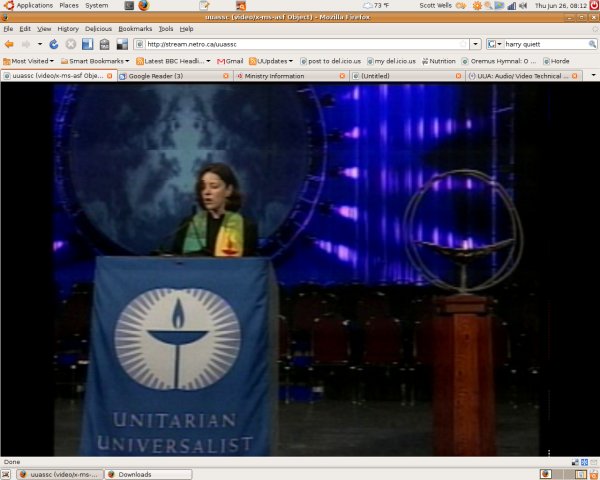
Still not thrilled with using a proprietary media format, but first things first. I got it to work. With wifi no less. (And you get to see what my desktop looks like.)

Thursday morning worship at GA, as seen on my machine

Now, how did I do it? Not entirely sure.

I am using VLC — the Swiss Army knife of media players; available for all the operating systems people really use — with the vcl-mozilla-plugin in place of my otherwise fave MPlayer (wth mozilla-plugin for the Firefox browser). There’s a codec (media decoder) plugin I got somewhere, but where? I’ll note it below when I find it.

Back to Fort Lauderdale. Oh, and while I’ve never liked that chalice, I do like the vortex. More vortex!

Open media formats for Unitarian Universalists

Are there any Unitarian Universalists — or keen open codec advocates who read this blog — who use Ogg Vorbis (audio) or Ogg Theora (video) to play, share, stream or store media? These are free and open-source media formats.

I may have a project.

In related news, I bought a refurb digital audio player (“MP3 player”) that supports Ogg and am enjoying it much. Of course, it takes a bit of work with Linux, but I hope to tell all once I have a successful workflow.

Ubuntu Linux 8.04 is here

I’ve been using Ubuntu Linux as my operating system of choice since 2004, and upgraded to the newest version (technically the release candidate) yesterday, also known as “the Hardy Heron”. The proper release is today, and if you’ve never used Linux, I hope you give it a try. It isn’t a radical improvement over the last version; it isn’t meant to be, but be stable and robust.

One added feature, called Wubi, is how Windows user can try Ubuntu Linux without committing to it:

There is a new installation option for Windows users. Wubi allows users to install and uninstall Ubuntu like any other Windows application. It does not require a dedicated partition, nor does it affect the existing bootloader, yet users can experience a dual-boot setup almost identical to a full installation. Wubi works with a physical CD or in stand-alone mode, by downloading an appropriate ISO to install from. It can be found on the root of the CD as Wubi.exe. A full installation within a dedicated partition is still recommended, but Wubi is a great way to try Ubuntu for a few days and weeks before committing dedicated disk resources.

That alone is worth a look. (Let me see if I can find someone who’s translated that quotation into Non_Geek.)

For details about the improvements since the last version, click here.

Epiphany browser fix

I love the Firefox browser — in theory. It’s free and open-source. It’s got tons of extensions . . . and that’s part of the problem. My former favorite browser is a terrible memory hog, at least on the (ahem) low-end machines that I can’t get enough of.

Better to use the browser developed for, and integrated with, the GNOME desktop, one of the main options on Linux desktop computers, and the default desktop for vanilla Ubuntu Linux. (New version tomorrow!) Thus the theologically-appealingly-named Epiphany browser. Its speedy because it doesn’t try to be all things. There are a modest set of extensions, which I added. More about that in a moment.

I had one complaint. When I Control-T’d to create new tabs, the cursor didn’t start in the address bar, so I would have to mouse to it to add an address. The solution is simple, if you know that the term term for starting in the documentation is focusing.

Set you start page as “blank” by going to Edit > Preferences > General tab > Home page > “Set to blank page.” It’ll work now.

But what I really love is the extension that synchs my bookmarks with my del.icio.us account, both from home and work. This allows easier tagging of sites I like and lets me search for saved sites by keyword in the address bar, rather than trying or looking for the URL. I can tell my Google searching has dropped already. (Then again, I have almost 2300 links recorded.)

The downside is that some sites break badly in Epiphany — it has a tiny market share — so I keep Firefox in reserve.